Showing posts with label Tutorial. Show all posts

Sunday, March 14, 2010

Tutorial to add Google AdSense code in your wordpress blog

Tutorial to add Google AdSense code in your wordpress blog

1. Sign up for Google AdSense or any other ads provider sites.
2. login into your Google AdSense account.
3. Copy the Google AdSense code.
4. Log into wordpress.com.
5. Click "My Dashboard" in the top navigation bar.


  1. wordpress.com - My Dashboard

  2. Click "Appearance" and then click "Widgets" in the left navigation bar.

    wordpress.com - Appearance - Widgets

  3. In the "Available Widgets" section, add a "Text" widget.
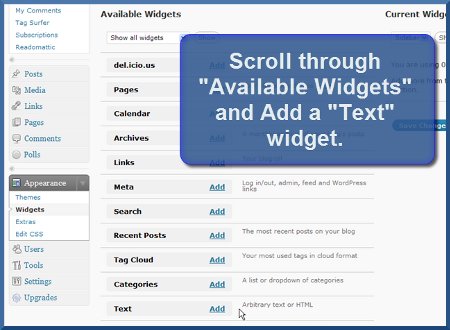
    wordpress.com - Add Text Widget

  4. A new "Text" option will now appear under the "Current Widgets" section of your wordpress dashboard - click the "Edit" link.

    wordpress.com - Edit Text Widget

  5. Paste your StatCounter code into the main body of the Text Widget.

    [caption id="attachment_81" align="alignnone" width="300" caption="aproof.wordpress.com"]aproof.wordpress.com[/caption]

  6. Click "Done".

  7. Click "Save Changes" and that's it!


Read more...

steps to add counter to your wordpress blog

steps to add counter to your wordpress blog

  1. Sign up for a free account at StatCounter or any other counter and follow the 'Install Code' wizard to generate your StatCounter code.

  2. When prompted, make sure to choose wordpress.com (hosted by wordpress) as your Blog/Web Page Editor from the drop down list.

  3. Copy the StatCounter code.

  4. Log into wordpress.com.

  5. Click "My Dashboard" in the top navigation bar.

    wordpress.com - My Dashboard

  6. Click "Appearance" and then click "Widgets" in the left navigation bar.

    wordpress.com - Appearance - Widgets

  7. In the "Available Widgets" section, add a "Text" widget.

    wordpress.com - Add Text Widget

  8. A new "Text" option will now appear under the "Current Widgets" section of your wordpress dashboard - click the "Edit" link.

    wordpress.com - Edit Text Widget

  9. Paste your StatCounter code into the main body of the Text Widget.

    wordpress.com - Paste StatCounter Code into Text Widget

  10. Click "Done".

  11. Click "Save Changes" and that's it!

  12. Your StatCounter will now begin recording visitor information and, if you chose the visible option, your counter will be visible on your blog! (The image below shows a sample StatCounter.)

    wordpress.com - Sample StatCounter on wordpress.com

Read more...

WordPress Installation Detailed Tutorial

WordPress Installation Detailed Tutorial


Please, follow the step-by-step guide below in order to activate Wordpress on your hosting account:

Step 1: Please, login to your CPanel and locate the Fantastico De Luxe icon:

Wordpress - CPanel - Fantastico

Step 2: Find and click the WordPress link.

Wordpress installation

Step 3: Then choose New Installation:

Wordpress - New Installation

Step 4: Decide upon the location of your blog - if you would like to have it as your site front page, leave the directory box blank, otherwise fill in the appropriate folder name. Next, fill in the administrator details and the e-mail account configuration then click the Install WordPress button.

Wordpress installation folder

Step 5: A new confirmation page will be loaded for the installation. Click the Finish Installation button if no errors are reported.

Wordpress - Finish Installation

If else you will have to go back and rectify the specified issues.

Step 6: After completing the installation the final screen will load, providing you with the installation details. You will be able to e-mail the details to a specified address also in order to keep them for future reference.

Wordpress - installation successful

Well done! You have successfully installed the Wordpress application!
Read more...

Saturday, March 13, 2010

Tutorial - ultrasn0w desbloqueando un con el iphone 3G OS 3.0

En este video se muestra claramente todos los pasos para lograr desbloquear un iphone 3G con la ultima version, la 3.0. Este video cubre prácticamente todo, desde la actualización a la versión 3.0, jailbreak Redsn0w con el y por el ultimo con desbloqueo ultrasn0w para poder con cualquier utilizarlo Operadora Telefónica. Para descargar los programas utilizados en este video, solo tienes que entrar al post original, en la siguiente direccion: iphonefanatico.com


http://www.youtube.com/watch?v=HKwAEpvetu8&hl=en

Friends Link : Review Shop to Home


Read more...

Tuesday, December 22, 2009

iPhone SDK Tutorial - Deutsch

iTunes: tinyurl.com Feed: feeds2.feedburner.com Video Source: iphonedev.blip.tv My first iPhone SDK Tutorial - in English. It starts at the very beginning and explains the basics of connecting InterfaceBuilder actions and calls with the corresponding classes in Xcode. The goal is a simple app that does nothing more than change the color of a label - also completely useless! twitter.com


http://www.youtube.com/watch?v=PD_P9szlRY4&hl=en

Related : Review Shop to Home Online Books Store New Sumsung TV Review


Read more...